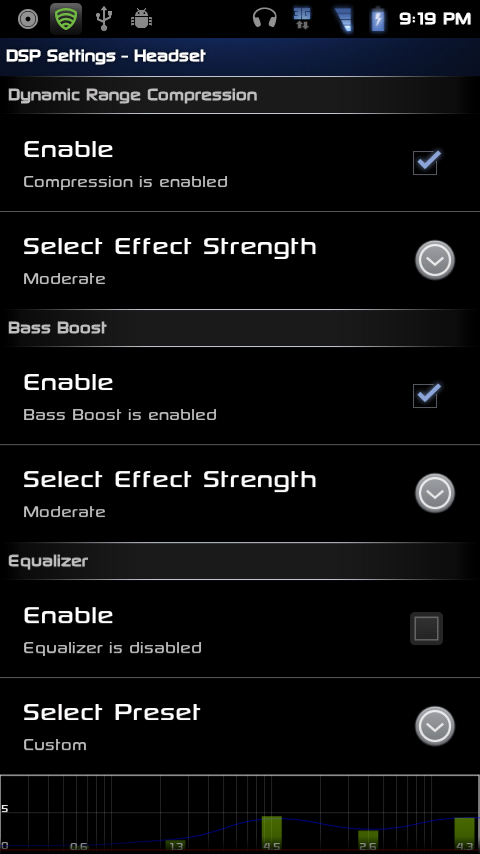
If you ever used CyanogenMOD ROM than you’re familiar with DSP Manager. It’s an application that let you control of your device audio settings. The app is very simple that let you change Equalizer manually or select from a bunch of preset options. The DSP Manager created by CynanogenMOD team for their ROM’s but was ported into standalone app and has been available for many devices. This app was ported to HTC One X and from their its ported to Galaxy S3 and according to XDA-Developer apascual89 its working fine for the S3.
To Install DSP Manager on Galaxy S3, your phone must be rooted and also need Custom recovery. If you’re happy with current setting of your phone than don’t try this on your device.
Install ClockworkMod Recovery (CWM) on Galaxy S3
Requirements:
- Download DSPmanager-v3.zip
- Backup is necessary incase anything goes wrong
- Rooted Galaxy S3 with recovery Installed
Instructions to install DSP Manager on Galaxy S3:
- Connect your phone to PC/laptop via USB cable
- Transfer DSPmanager-v3.zip to root of your SDcard
- Restart your phone in recovery
- Select ‘Install zip from sd card’
- choose ‘zip from sd card’ and select DSPmanager zip file that you transferred in step 2.
- Once the installation is complete, select go back then select reboot system now to Reboot your phone
Congrats You’ve successfully installed DSP Manager on Galaxy S3.
[via]
If you ever used CyanogenMOD ROM than you’re familiar with DSP Manager. It’s an application that let you control of your device audio settings. The app is very simple that let you change Equalizer manually or select from a bunch of preset options. The DSP Manager created by CynanogenMOD team for their ROM’s but was ported into standalone app and has been available for many devices. This app was ported to HTC One X and from their its ported to Galaxy S3 and according to XDA-Developer apascual89 its working fine for the S3.
To Install DSP Manager on Galaxy S3, your phone must be rooted and also need Custom recovery. If you’re happy with current setting of your phone than don’t try this on your device.
Install ClockworkMod Recovery (CWM) on Galaxy S3
Requirements:
- Download DSPmanager-v3.zip
- Backup is necessary incase anything goes wrong
- Rooted Galaxy S3 with recovery Installed
Instructions to install DSP Manager on Galaxy S3:
- Connect your phone to PC/laptop via USB cable
- Transfer DSPmanager-v3.zip to root of your SDcard
- Restart your phone in recovery
- Select ‘Install zip from sd card’
- choose ‘zip from sd card’ and select DSPmanager zip file that you transferred in step 2.
- Once the installation is complete, select go back then select reboot system now to Reboot your phone
Congrats You’ve successfully installed DSP Manager on Galaxy S3.
[via]