

















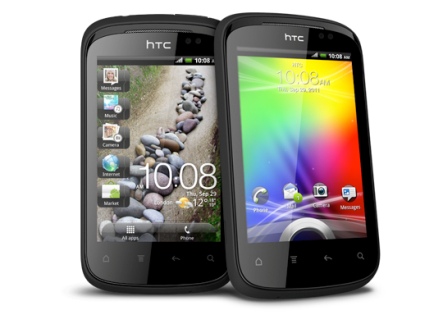
The HTC Explorer is a low-end Android phone from HTC. This tutorial helps you to Root HTC Explorer by using this simple method. Rooting in Android will give you access to core files and more control over full system. After rooting you can install 3rd party apps and customized themes. Most of the time Rooting any device didn’t really comfortable as most of the time users break their device.
[box type=”warning”] Rooting will void your warranty or may brick your device. Razzil will not be responsible for any damage.[/box]
Prepare your phone for Root:
- Backup your data
- Min 60% Battery backup in your phone
- Download HTC Sync
- Download A310E Recovery
- Download Superuser
Instructions to Root HTC Explorer:
- First Unlock your HTC Explorer by following the steps in http://www.htcdev.com/bootloader
- Install HTC Sync in your computer and also enable USB debugging in your phone (Settings –> Applicatons –>Development –> USB Debugging)
- Connect your phone to the computer using USB Cable
- Extract A310 Recovery Zip in your computer
- Reboot phone to bootloader and choose fastboot option.
- Now run the “recovery.bat”, wait for the process to complete.
- Congrats You’ve successfully installed CWM Recovery.
- Transfer Superuser Zip to your Root of the SD Card
- Reboot your mobile into Recovery Mode (hold Volume Down + Power button)
- Once you’re in Recovery mode, you need to select “install zip from sd card” and then select ‘”choose zip from SD Card”.
- Choose the Superuser file that you transferred in the above steps
- Wait till installing finished, Now select “Go Back” then “reboot”
- Kudos You’ve successfully rooted HTC Explorer
stuck in the step “Now run the “recovery.bat”, wait for the process to complete” how much time it will take to complete this step?
Guided you on FB. Hope you’re enjoying Rooted Explorer.
Superuser file has been deleted.
I am not able to unlock the phone. It goes into vicious circle when i give fastboot and then bootloader. Not able to reach step 4 given in the htc bootloader unlock site. Any idea why ?
htc explorer A310e kullanıyorum ekran kilidimin şifresini yanlış yazdım ve şimdide benden kullanıcı(e posta) ve parola istiyor napmalıyım yardımcı olursanız sevinirim
i hav rooted my phone,istalled superuser.zip and accidently have done factory data reset,and now my phone has gone in bootloop….i didnt backed up the rom…what should i do???
help needed urgent!!!!!!!!!!!!
HI brother i cant find cyanogenmod on rom manageer when i click download roms.pls help soon.
Please man get it
unlocking boot loader i did it in october 20th itself(after a few days of release.I was only shocked it will be bricked but i know that if bricked it cannot on itself.Pls “I need an original HTC Explorer A310e rom”
NO thanks brother. I installed jaggy rom.I am also a tiny blogger like you .One favour u could do me last is i need an original HTC EXXPLORER ROM-from india
Difficult task, please go to the XDA-developers.com and create your thread.
hi man i followed the steps my htc explorer stuck with “htc” on boot .please help me soon .my dad scolds me.my email id id falcon1235@gmail.com
You struck while unlocking bootloader or in rooting process?
I understand that rooting the device will void rhe warranty….. Can the warranty again be revoked? (specific to htc explorer)
Nope, warranty can’t revoked.
I recently bought htc explorer. So after running the recovery.bat file..instead of copying Superuser Zip file to the sd card, can i copy JaggyRom zp to the sd card to instal custom rom?
First you’ve to root your phone after that you can install as many ROM on it. For installing ROM phone must be rooted.
[…] It has 3.2-inch touch screen with 320 x 480 resolution. HTC Explorer has powered by 600MHz Scorpion CPU, Adreno 200 GPU, Qulacomm MSM7227 chipset with 512 MB ROM, 512 MB RAM and 90 MB internal memory. HTC is powered by Android v2.3 (Gingerbread) with HTC Sense. It has 3 megapixel camera with autofocus, Geo-tagging and Face detection. Camera pixels may hurt the users. Access Mail, text messages, contacts and camera right from the Lock screen. How to Root HTC Explorer […]