









Root Sony Xperia Sola [Tutorial]

Sony Xperia Sola

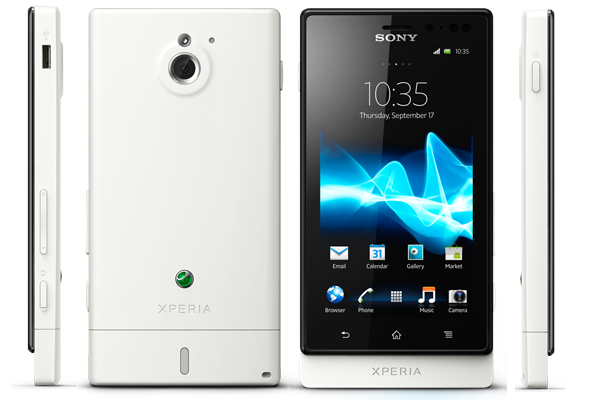
Sony Xperia Sola got rooted by developer DoomLord. The phone has 1 GHz STE U8500 Dual Core processor, 5 MP camera and NFC, 512 MB of RAM. Here Rooting is done by Kernel and you need Fastboot in your PC. The phone has decent specs and you’ll able to extract more from this phone after rooting. This simple tutorial help you to Root Sony Xperia Sola, but before proceeding to root process, please unlock the bootloader of the phone. In any rooting process, backup is necessary. So Backup your phone to avoid any data loss.

Advantage of Rooting:

  • You Can remove all junky system apps that you don’t want to use.
  • You can install clockwork recovery mode(CWM)
  • You can install any ROM on your phone.
  • Improved the performance of phone.

This process was made only for Sony Xperia Sola, don’t try to attempt this method on any other Xperia phone. Rooting phone will void your warranty or may cause damage to your phone. Please read the instructions carefully. Razzil will not be responsible for any damage.

Requirements:

Instructions to Root Sony Xperia Sola:

  1. Download the Kernel.elf and save it to the fastboot binaries folder or if you’ve android sdk then copy it to the “…\android-sdk\platform-tools” folder.
  2. Switch off your phone
  3. Reinsert the battery and start the phone in fastboot mode ( Hold Power Down and Volume Up key)
  4. Connect your mobile with computer
  5. Open the command prompt and heads to fastboot folder
  6. enter the following command ‘fastboot flash boot kernel.elf’
  7. Wait for the process to complete. Once done
  8. restart your phone by typing following command ‘fastboot reboot’.

Kudos You’ve successfully rooted your Sony Xperia Sola.

Sony Xperia Sola

Sony Xperia Sola got rooted by developer DoomLord. The phone has 1 GHz STE U8500 Dual Core processor, 5 MP camera and NFC, 512 MB of RAM. Here Rooting is done by Kernel and you need Fastboot in your PC. The phone has decent specs and you’ll able to extract more from this phone after rooting. This simple tutorial help you to Root Sony Xperia Sola, but before proceeding to root process, please unlock the bootloader of the phone. In any rooting process, backup is necessary. So Backup your phone to avoid any data loss.

Advantage of Rooting:

  • You Can remove all junky system apps that you don’t want to use.
  • You can install clockwork recovery mode(CWM)
  • You can install any ROM on your phone.
  • Improved the performance of phone.

This process was made only for Sony Xperia Sola, don’t try to attempt this method on any other Xperia phone. Rooting phone will void your warranty or may cause damage to your phone. Please read the instructions carefully. Razzil will not be responsible for any damage.

Requirements:

Instructions to Root Sony Xperia Sola:

  1. Download the Kernel.elf and save it to the fastboot binaries folder or if you’ve android sdk then copy it to the “…\android-sdk\platform-tools” folder.
  2. Switch off your phone
  3. Reinsert the battery and start the phone in fastboot mode ( Hold Power Down and Volume Up key)
  4. Connect your mobile with computer
  5. Open the command prompt and heads to fastboot folder
  6. enter the following command ‘fastboot flash boot kernel.elf’
  7. Wait for the process to complete. Once done
  8. restart your phone by typing following command ‘fastboot reboot’.

Kudos You’ve successfully rooted your Sony Xperia Sola.

Raza Rahil Hussain
Raza Rahil Hussain
I’m a Founder of Razzil, a Web 3.0 enthusiast, who loves the Internet. I am an innovator mind and love to do creative work.

More from author

LEAVE A REPLY

Please enter your comment!
Please enter your name here

Related posts

Advertismentspot_img

Latest posts

Aula F99 Pro Review – The Best 96% Budget Mechanical Keyboard?

If you're in the market for a quality mechanical keyboard on a budget, you'll find plenty of options from brands like Aula, Ajazz, Weikav,...

How to Install Home Assistant Core on Raspberry Pi 5

Home Assistant is an open-source project that is single-handedly taking home automation to the next level. It's not just a platform to manage your...

Vivo India Launches the Vivo X200 Series with ZEISS Camera Experience

Vivo India has launched the Vivo X200 Series in India, featuring a ZEISS Camera experience. Both the Vivo X200 and X200 Pro are now...

Want to stay up to date with the latest news?

We would love to hear from you! Please fill in your details and we will stay in touch. It's that simple!