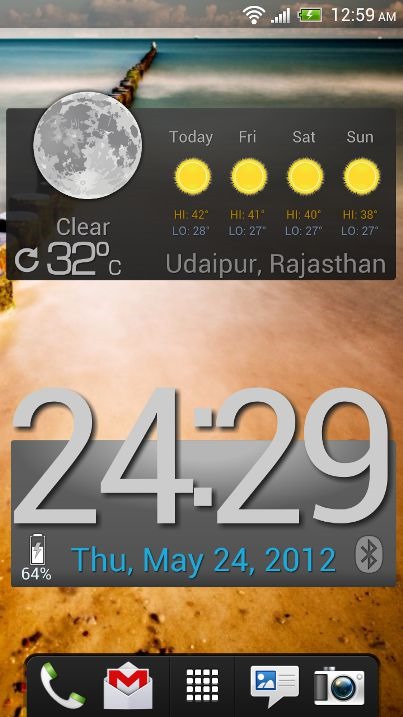
Previously I talked about 1Weather app for Android which is one of the beautiful weather app but that app lack customization. Recast brings customizable weather app for android. The Recast Weather app is compatible with Android phones, tablet and Google TV. Its require Android 2.2 or greater to run. The best part of the Recast is that it allow users to customize nearly everything about the look and feel. You can customize both Weather app and widget to suite your taste.
Recast allow you to choose from multiple, different weather icon sets, Customize the data formats and weather providers, colors, widget icon, background, fonts & typefaces. You can add as many location you want and For Android 3.x and 4.x users can resize the widgets from the homescreen.
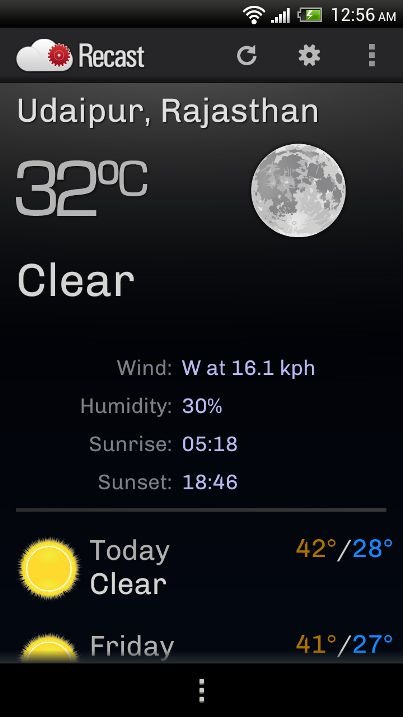
When you start the app, the app will sense your location and plot the default weather style. The app will show the current temperature along with future forecast, Wind speed, Humidity, Sunrise and Sunset time. Click on Setting menu on Actionbar allow you to customize the app. The Settings page divided into four tabs: Views which allow you to customize Full Screen forecast and weather widget, Locations tab let you customize the location such as Weather source, time display format, temperature units, time zone etc. You can set different setting for different locations. Templates tab allow you pick from series of Weather icon sets, Utility icons sets, Typefaces, Fonts and Widgets. General Tab allow you to customize Weather frequency, location frequency, Metric units etc.
Recast is must have app for those who love to design their own customizable widget on your homescreen. The app is still in beta but still it works flawlessly on our device. For best possible result, enable GPS so that app sense your location correctly.
Check out Video demo:
[iframe: width=”640″ height=”480″ src=”http://www.youtube.com/embed/IejVblSpxYE?rel=0″ frameborder=”0″ allowfullscreen]
Download Recast beta
Previously I talked about 1Weather app for Android which is one of the beautiful weather app but that app lack customization. Recast brings customizable weather app for android. The Recast Weather app is compatible with Android phones, tablet and Google TV. Its require Android 2.2 or greater to run. The best part of the Recast is that it allow users to customize nearly everything about the look and feel. You can customize both Weather app and widget to suite your taste.
Recast allow you to choose from multiple, different weather icon sets, Customize the data formats and weather providers, colors, widget icon, background, fonts & typefaces. You can add as many location you want and For Android 3.x and 4.x users can resize the widgets from the homescreen.
When you start the app, the app will sense your location and plot the default weather style. The app will show the current temperature along with future forecast, Wind speed, Humidity, Sunrise and Sunset time. Click on Setting menu on Actionbar allow you to customize the app. The Settings page divided into four tabs: Views which allow you to customize Full Screen forecast and weather widget, Locations tab let you customize the location such as Weather source, time display format, temperature units, time zone etc. You can set different setting for different locations. Templates tab allow you pick from series of Weather icon sets, Utility icons sets, Typefaces, Fonts and Widgets. General Tab allow you to customize Weather frequency, location frequency, Metric units etc.
Recast is must have app for those who love to design their own customizable widget on your homescreen. The app is still in beta but still it works flawlessly on our device. For best possible result, enable GPS so that app sense your location correctly.
Check out Video demo:
[iframe: width=”640″ height=”480″ src=”http://www.youtube.com/embed/IejVblSpxYE?rel=0″ frameborder=”0″ allowfullscreen]
Download Recast beta