
















How to Root & Install ClockworkMod (CWM) Recovery on HTC Desire X

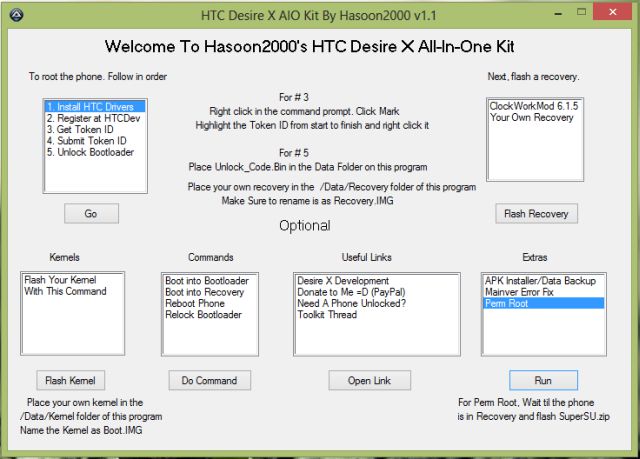
XDA Developer hasoon2000 released All-in-toolkit for the Mid-Range phone HTC Desire X. All-in-one toolkit is a GUI program that allows user to perform different activities on their phone such as Unlocking Bootloader, Flashing Kernel, Flashing Recovery, Rooting and much more on HTC Desire X. The Toolkit is for Newbies users who are new in Android hacking and want to hack their Desire X.
Root & CWM Desire X

All-in-one toolkit allow users to Root & Install ClockworkMod (CWM) Recovery on HTC Desire X.


Rooting phone will void your warranty or may cause damage to your phone. Please read the instructions carefully. Razzil will not be responsible for any damage.

Requirements:

[arrow_list]

[/arrow_list]

Instructions to Root & Install CWM Recovery on HTC Desire X:

  1. Login to HTCDev site and follow the instruction to acquire unlock_code.bin
  2. Download “All in One Toolkit” from above link and extract it in your computer
  3. Now drag unlock_code.in to “Data” folder. For e.g c:/Desire_X_All-In-One_Kit_v1.1/Data
  4. Double click Desire X to open the application
  5. Select “Install HTC Drivers” and click “Go” to install all drivers. (Avoid if already installed)
  6. Reboot your phone into Fastboot (Volume Down + Power)
  7. Connect your phone to PC via USB Cable
  8. Select “5. Unlock Bootloader” and click “Go” to unlock Bootloader of Desire X.
  9. The phone will restart
  10. Now you’re ready to Root & Install CWM in your phone
  11. Reboot your phone into Bootloader (you can use the application), Enter into fastboot.
  12. Select “ClockWorkMod” in the application & click “Flash Recovery” button to flash CWM Recovery
  13. Once CWM Recovery installed, you can use the same application to Root your phone

[via]

XDA Developer hasoon2000 released All-in-toolkit for the Mid-Range phone HTC Desire X. All-in-one toolkit is a GUI program that allows user to perform different activities on their phone such as Unlocking Bootloader, Flashing Kernel, Flashing Recovery, Rooting and much more on HTC Desire X. The Toolkit is for Newbies users who are new in Android hacking and want to hack their Desire X.

Root & CWM Desire X

All-in-one toolkit allow users to Root & Install ClockworkMod (CWM) Recovery on HTC Desire X.


Rooting phone will void your warranty or may cause damage to your phone. Please read the instructions carefully. Razzil will not be responsible for any damage.

Requirements:

[arrow_list]

[/arrow_list]

Instructions to Root & Install CWM Recovery on HTC Desire X:

  1. Login to HTCDev site and follow the instruction to acquire unlock_code.bin
  2. Download “All in One Toolkit” from above link and extract it in your computer
  3. Now drag unlock_code.in to “Data” folder. For e.g c:/Desire_X_All-In-One_Kit_v1.1/Data
  4. Double click Desire X to open the application
  5. Select “Install HTC Drivers” and click “Go” to install all drivers. (Avoid if already installed)
  6. Reboot your phone into Fastboot (Volume Down + Power)
  7. Connect your phone to PC via USB Cable
  8. Select “5. Unlock Bootloader” and click “Go” to unlock Bootloader of Desire X.
  9. The phone will restart
  10. Now you’re ready to Root & Install CWM in your phone
  11. Reboot your phone into Bootloader (you can use the application), Enter into fastboot.
  12. Select “ClockWorkMod” in the application & click “Flash Recovery” button to flash CWM Recovery
  13. Once CWM Recovery installed, you can use the same application to Root your phone

[via]

Raza Rahil Hussain
Raza Rahil Hussain
I’m a Founder of Razzil, a Web 3.0 enthusiast, who loves the Internet. I am an innovator mind and love to do creative work.

More from author

1 COMMENT

  1. Razzil

    Your guide is clear, very informative and useful to many.

    I have HTC Explorer mobile and interested in rooting this mobile.

    Please send the detailed procedure to root this mobile.

    Thanks in advance

    A. S. Bhasker Raj
    Bangalore
    Mobile:+919590150505

LEAVE A REPLY

Please enter your comment!
Please enter your name here

Related posts

Advertismentspot_img

Latest posts

Aula F99 Pro Review – The Best 96% Budget Mechanical Keyboard?

If you're in the market for a quality mechanical keyboard on a budget, you'll find plenty of options from brands like Aula, Ajazz, Weikav,...

How to Install Home Assistant Core on Raspberry Pi 5

Home Assistant is an open-source project that is single-handedly taking home automation to the next level. It's not just a platform to manage your...

Vivo India Launches the Vivo X200 Series with ZEISS Camera Experience

Vivo India has launched the Vivo X200 Series in India, featuring a ZEISS Camera experience. Both the Vivo X200 and X200 Pro are now...

Want to stay up to date with the latest news?

We would love to hear from you! Please fill in your details and we will stay in touch. It's that simple!