
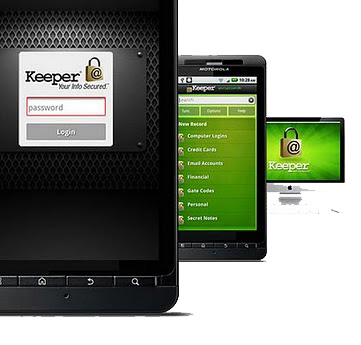
Keep Your Private Data & Password safe with Keeper for Android

Keeper for Android

Security is always big concerns in Smartphones, Everyday new Trojan release to hijack your data and Android is the favorite OS. Keeper for Android allow users to keep its private data safe at one place. Keeper safeguard your passwords and private information on your Android device by using military-grade AES encryption. You’ve to create one master password to access your information. The Keeper is available for most of the mobile operating system and it allow you to sync your data to all your devices.

You can login to your favorite site with one touch or keeper help you to generate secure password for your new account. If someone entered wrong password more than 5 times, Keeper will automatically wipe all your data. This  feature is optional and you’ve to enable it from settings.

Features of Keeper for Android:

  • Generate secure & different password for different sites
  • Using 128-bit AES encryption
  • Instantly search records
  • No limit on the number of records you store
  • Sync data to all devices (Paid feature)
  • Cloud backup (Paid Feature)
  • Back up to Keeper’s Cloud Security Vault™ or to your computer (Paid Feature)
  • Wiping out all of its content after five failed password attempts
  • Remotely denoted all data


You can enjoy Paid version at no charge for 30 days and after 30 days, you’ve to upgrade with 1 $9.99 payment for annual subscription.

[app]com.callpod.android_apps.keeper[/app]

Keeper for Android

Security is always big concerns in Smartphones, Everyday new Trojan release to hijack your data and Android is the favorite OS. Keeper for Android allow users to keep its private data safe at one place. Keeper safeguard your passwords and private information on your Android device by using military-grade AES encryption. You’ve to create one master password to access your information. The Keeper is available for most of the mobile operating system and it allow you to sync your data to all your devices.

You can login to your favorite site with one touch or keeper help you to generate secure password for your new account. If someone entered wrong password more than 5 times, Keeper will automatically wipe all your data. This  feature is optional and you’ve to enable it from settings.

Features of Keeper for Android:

  • Generate secure & different password for different sites
  • Using 128-bit AES encryption
  • Instantly search records
  • No limit on the number of records you store
  • Sync data to all devices (Paid feature)
  • Cloud backup (Paid Feature)
  • Back up to Keeper’s Cloud Security Vault™ or to your computer (Paid Feature)
  • Wiping out all of its content after five failed password attempts
  • Remotely denoted all data


You can enjoy Paid version at no charge for 30 days and after 30 days, you’ve to upgrade with 1 $9.99 payment for annual subscription.

[app]com.callpod.android_apps.keeper[/app]

Raza Rahil Hussain
Raza Rahil Hussain
I’m a Founder of Razzil, a Web 3.0 enthusiast, who loves the Internet. I am an innovator mind and love to do creative work.

More from author

LEAVE A REPLY

Please enter your comment!
Please enter your name here

Related posts

Advertismentspot_img

Latest posts

Aula F99 Pro Review – The Best 96% Budget Mechanical Keyboard?

If you're in the market for a quality mechanical keyboard on a budget, you'll find plenty of options from brands like Aula, Ajazz, Weikav,...

How to Install Home Assistant Core on Raspberry Pi 5

Home Assistant is an open-source project that is single-handedly taking home automation to the next level. It's not just a platform to manage your...

Vivo India Launches the Vivo X200 Series with ZEISS Camera Experience

Vivo India has launched the Vivo X200 Series in India, featuring a ZEISS Camera experience. Both the Vivo X200 and X200 Pro are now...

Want to stay up to date with the latest news?

We would love to hear from you! Please fill in your details and we will stay in touch. It's that simple!