















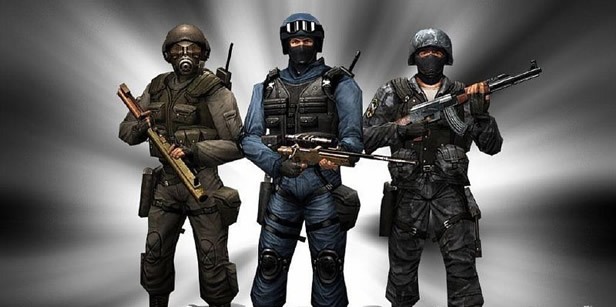
Counter- Strike World Most Popular Multiplayer Game, especially in College. Many College organize the Event on Counter-Strike. In College they play Counter-Strike on LAN, they setup the networking and connect PC all together.
What happen If we have to do practice for Counter- Strike but we have don’t have the LAN. Don’t Worry I resolve this problem, if you have Wi-Fi in your PC/Laptop then you can also play Counter-Strike without LAN.
Step 1. First give the unique Static IP to every Laptop.
Step 2. Now Go to Control Panel>Network and Internet>Manage Wireless Networks. The Following window is open.
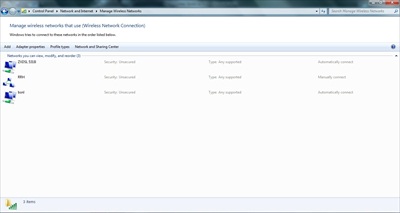
Step 3. Click on Add button. The following window is open.
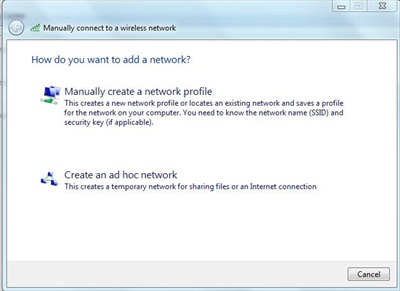
Step 4. Click on Create an ad hoc network then click Next,
Step 5. Enter any Network name, choose your Security Type and then click Next.
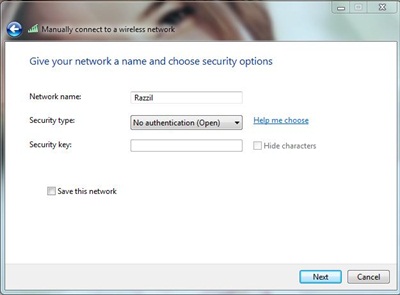
NOTE: If you want to enable you Security, then choose WEP otherwise click on “No authentication (open)”.
Step 6. Close the Window, and You are done.
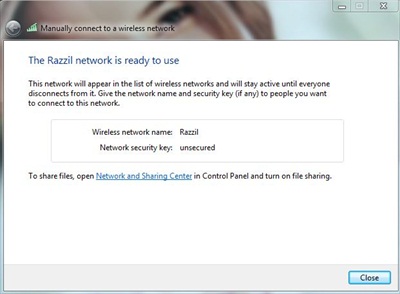
Step 7. Now tell you friend to Start Wi-Fi, find your network and click connect.
Step 8. Start Counter-Strike, Create Server and start the Game.
Step 9. Tell your friend to start the Counter-Strike, click on Find Server and connect it.
You are done.This is great thing to time pass in your college canteen. If you have any query, please comment it out.









It works.. But the issue is most of time the game gets hanged. How to reduce the latency?
outstanding
Can someone tell mi how can I play CS on my laptop, but I don’t want to be the host or to create game. I want to connect on a random server that I find on the internet.
I use to play CS without problems on my PC on servers that I found on http://www.gametracker.com
just pick server that I want and game starts automatically.
But now I can’t play it on my laptop.
My laptop is wirelessly connected to my TP LINK router and when pick server on gametracker.com it just starts the game but it want connect to the server. Just starts, opened console, but doesn’t connect.
PLEAS some help me :(
Sorry for my bad English
How about linux users?How can we use it?
I play with friends using ad hoc network.Is there any way to reduce latency on ad hoc .
WORKS FOR ME
i am not able to start the server in counter strike game ,how to create the server please explain
Hey :) thnq fr a very nice post. Hope u wud b able to help me too. I have 4 PCs on a wifi router modem. 3 running on xp n 1 on Win7. When I go to my network places I can clearly see all the 4 Pcs connected and i can browse through shared folders copy files etc. But counter strike just wont find any. I have tried running game on all 4 Pcs and neither of the 3 computers can detect any server. Same version of game is running on all 4 PCs. I wonder what the problem is. Hopefully you will be able to help
No, it didn’t work for me too.
My friend is already connected to my WLAN Network but still doesn’t show the server in my CS Server list ^_^
do we need need wi-fi modem in each house hole???ans plz…
No you don’t need any Wi-Fi Router. Wi-Fi enabled laptop is enough.
hey man, thanks a lot.. been great help… salutations…
Did you know that “Razzil” has an unplesant meaning in arabic?
Nope, what is the meaning of Razzil ? :)
I tried everything possible to connect 2 systems by wifi i managed to connect them by lan and play buy can’t do it by wifi can u help me.
Followed the instructions as exactly said. But couldn’t find any server in CS :(
I did achoc already but i can’t findserver in Counter-Strike
Hi
How to set Static IP?
Thanks
plz ansowr me
can you goive a video tutorials
or show me how I give each one a fix ip
My friend and i have no problem connecting to play , but the game become SUPER laggy(3 to 4K) anyway we can ensure smooth play ?
SHW , do you use exactly like the tutorial above ?
did you need the internet connection to play CS in LAN mode ?
thanks :)
i had same problem
i m using windows 7
laptop is connected via wifi
but still not connected in cs
I am facing the same problem… !!
using Windows 7 when i create a server in CS ..
i doesn’t show up on other laptops that are connected via wifi.. !!
things were much eaisier in windows XP…
hey dude. i tried doing your procedure in the set up of wireless LAN for playing counter strike. it didn’t work. i already have a WLAN made and there was no server that i can find when i’m playing CS. how can i solve this?
The Above tutorials is created in Windows 7 it might be different in other OS, Which OS are you using?
[…] This post was mentioned on Twitter by razzil.com, razzil.com. razzil.com said: Play Counter-Strike via Wi-Fi – (via @razzilcom) […]